Showing posts with label Job. Show all posts

How to Prepare For a Phone Interview?


Here are a few tips to help you prepare for a phone interview:

  1. Find a quiet and private place to conduct the interview: Choose a location where you can speak freely without interruptions or distractions.

  2. Have a copy of your resume and the job posting handy: Review your resume and the job posting before the interview, so that you can refer to them if needed.

  3. Use a landline or a reliable internet connection: Make sure that you have a good phone connection or a stable internet connection for the interview.

  4. Stand or sit in a comfortable and professional position: Standing or sitting in a comfortable and professional position can help you to speak clearly and confidently.

  5. Have a pen and paper handy: Have a pen and paper handy to take notes during the interview.

  6. Be on time: Make sure to answer the phone on time, as being late can create a bad impression.

  7. Smile and speak clearly: Smiling and speaking clearly can help you to come across as friendly and professional during the interview.

Overall, the key to preparing for a phone interview is to create a comfortable and professional environment, review the relevant information beforehand, and focus on speaking clearly and confidently.

How to Prepare Fresher New Job Applicants for the Toughest Job Interviews?


To help fresher new job applicants prepare for the toughest job interviews, you can follow these steps:

  1. Research the company and the role: Encourage applicants to research the company and the role that they are applying for, so that they can understand the company's values, products, and services, and the main responsibilities and challenges of the job.

  2. Practice common interview questions: Help applicants to practice answering common interview questions, such as "Tell me about yourself," "What are your strengths and weaknesses," and "Why do you want to work for our company?" This can help them to feel more confident and prepared during the interview.

  3. Provide tips on how to answer tough questions: Help applicants to prepare for tougher questions that they may be asked during the interview, such as "What are your long-term career goals?" or "How do you handle criticism?" By anticipating these questions and practicing their answers, applicants can be better prepared for any challenges that may arise during the interview.

  4. Encourage them to ask questions: Encourage applicants to prepare thoughtful questions to ask the interviewer, as this can show that they are engaged and interested in the opportunity.

  5. Remind them to dress professionally and arrive on time: Finally, remind applicants to dress professionally and arrive on time for the interview, as this can make a good impression on the interviewer and show that they are serious about the opportunity.

How to Answer Interview Fresher Questions?


When answering interview questions as a fresher, it is important to focus on your potential and enthusiasm for the role, rather than your lack of experience. Here are a few tips to help you answer interview questions as a fresher:

  1. Emphasize your education and any relevant coursework or internships that you have completed. This can help to demonstrate your knowledge and skills in the field.

  2. Highlight any transferable skills that you have acquired through part-time jobs, internships, or other experiences, such as communication, teamwork, or problem-solving skills.

  3. Show enthusiasm for the role and the company, and explain why you are interested in working there.

  4. Discuss any relevant projects or assignments that you have completed, and highlight any achievements or accomplishments that you are proud of.

  5. Be prepared to ask thoughtful questions about the role, the company, and the industry, as this can show that you are engaged and interested in the opportunity.

Overall, the key to answering interview questions as a fresher is to focus on your potential and show that you are eager to learn and grow in the role.

How to Write a Two Weeks Notice Letter?


A notice letter is a written document that is used to inform or notify someone of something. Notice letters can be used for a variety of purposes, such as to inform someone of a change in policy, to provide notice of an upcoming event, or to notify someone of a problem that needs to be addressed.

Notice letters typically follow a standard format, which includes the following elements:

  • The sender's contact information, including their name, address, phone number, and email address
  • The recipient's contact information, including their name, address, and title (if applicable)
  • A clear and concise subject line that summarizes the purpose of the letter
  • A salutation, such as "Dear [Recipient's Name]"
  • The body of the letter, which provides the necessary information and details about the subject of the letter
  • A closing, such as "Sincerely" or "Best regards," followed by the sender's signature and name

Notice letters should be written in a professional and respectful tone, and should provide clear and concise information. They should also be sent in a timely manner, so that the recipient has sufficient time to respond or take action if necessary.

Overall, a notice letter is a written document that is used to inform or notify someone of something. Notice letters typically follow a standard format, and should be written in a professional and respectful tone.

How to Write a Two Weeks Notice Letter?


To write a two weeks notice letter, you will need to follow these steps:

  1. Start by identifying the recipient of the letter. This should be your employer, or the person who is responsible for managing your employment.

  2. Include your contact information, as well as the recipient's contact information, at the top of the letter. This should include your name, address, phone number, and email address, as well as the recipient's name, title, and contact information.

  3. Create a clear and concise subject line that summarizes the purpose of the letter. For example, you could use a subject line such as "Two Weeks Notice" or "Resignation Notice."

  4. Begin the letter with a salutation, such as "Dear [Recipient's Name]."

  5. In the body of the letter, provide a brief explanation of why you are resigning and when your last day of work will be. Be sure to include the date that you will be leaving, as well as any other relevant information.

  6. Thank your employer for the opportunity to work with them, and express your willingness to help with the transition process.

  7. Close the letter with a professional closing, such as "Sincerely" or "Best regards," followed by your signature and name.

Overall, to write a two weeks notice letter, you will need to include your contact information, the recipient's contact information, a clear subject line, a salutation, a brief explanation of your resignation, a professional closing, and your signature and name. This letter should be written in a professional and respectful tone, and should be sent in a timely manner.

How Much Does It Cost To Move Out Of State?


If you are planning to move out of state, there are a few important steps you should take to ensure that the process goes smoothly. Here are some tips for moving out of state:

  1. Plan ahead and start the process as early as possible. Moving to a new state can be a complex and time-consuming process, so it's important to give yourself plenty of time to plan and prepare.

  2. Research the state you are moving to, and learn about the cost of living, housing options, job opportunities, and other important factors. This will help you make informed decisions about where to live and how to budget for your move.

  3. Create a budget and make a plan for your move. This should include expenses such as moving costs, deposits for utilities and housing, and any other costs associated with your move.

  4. Start organizing and packing your belongings. Make a list of everything you need to pack, and consider hiring a professional moving company to help with the process.

  5. Transfer your utilities, change your address, and update your identification documents. This will ensure that you have access to essential services, and that your identification documents reflect your new address.

Overall, moving out of state can be a complex and time-consuming process, but by following these steps and planning ahead, you can make the process go smoothly and successfully settle into your new state.

The cost of moving out of state will vary depending on a number of factors, such as the distance of the move, the amount of belongings you have, and whether you hire a professional moving company. In general, however, the cost of moving out of state can range from several hundred dollars to several thousand dollars.

Here are some factors that can affect the cost of moving out of state:

  • Distance: The further you are moving, the more it will cost. Moving a short distance within the same state may cost several hundred dollars, while moving across the country can cost several thousand dollars.

  • Amount of belongings: The more belongings you have, the more it will cost to move them. If you have a lot of large or heavy items, such as furniture or appliances, it will be more expensive to move them than if you only have a few boxes of small items.

  • Professional moving company: Hiring a professional moving company can significantly increase the cost of your move. However, it can also save you time and stress, and can ensure that your belongings are handled properly and arrive safely at your new home.

Overall, the cost of moving out of state can vary depending on a number of factors. By considering these factors and budgeting carefully, you can make an informed decision about the cost of your move and plan accordingly.

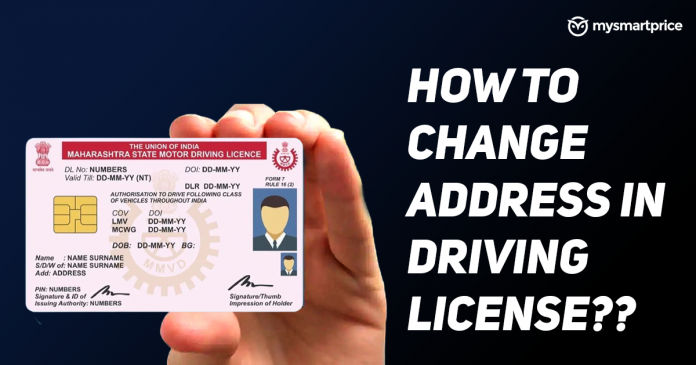
How to Change Address on Driving Licence?


A driving license is an official document issued by a government agency that enables an individual to operate a motor vehicle on public roads. In most countries, driving licenses are issued after the individual has passed a driving test and met other eligibility requirements, such as age and residency.

A driving license typically includes the holder's name, date of birth, photograph, and signature, as well as other identifying information. In many countries, driving licenses are also used as a form of identification and may be required for activities such as opening a bank account or purchasing alcohol.

Driving licenses are typically valid for a certain number of years, and must be renewed after they expire. In some cases, driving licenses may be suspended or revoked if the holder is found to be in violation of traffic laws or other regulations.

Overall, a driving license is an important document that enables an individual to operate a motor vehicle on public roads. It is typically obtained by passing a driving test and meeting other eligibility requirements, and must be renewed periodically to remain valid.

To change your address on your driving license, you will need to contact the agency or department in your country or state that is responsible for issuing and maintaining driving licenses. In most cases, you will need to provide proof of your new address, such as a utility bill or bank statement, and pay a fee to have the change processed.

Here are the steps to change your address on your driving license:

  1. Gather any required documents, such as proof of your new address and any applicable fees.

  2. Contact the agency or department responsible for issuing and maintaining driving licenses in your country or state. This may be done in person, by phone, or online, depending on the specific requirements of the agency.

  3. Provide the required information and documents, and pay any applicable fees.

  4. Wait for your driving license to be updated with your new address. This may take a few days to a few weeks, depending on the processing times of the agency.

  5. Once your driving license has been updated, you can start using it with your new address.

Overall, changing your address on your driving license is a simple process that can typically be done by contacting the agency responsible for issuing and maintaining driving licenses in your country or state. By providing the required information and documents, and paying any applicable fees, you can have your driving license updated with your new address.

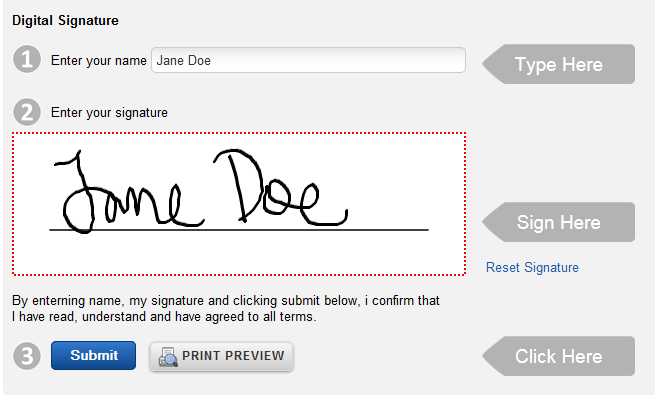
How to Create a Digital Signature?


A digital signature is a type of electronic signature that uses a digital certificate and encryption to verify the authenticity and integrity of a document. Digital signatures are typically used to sign electronic documents, such as PDFs, Word files, or Excel spreadsheets, and are considered to be a secure and legally binding way to sign documents electronically.

Digital signatures use public key cryptography, which involves the use of a private key and a public key to encrypt and decrypt data. When a user creates a digital signature, the private key is used to create a unique digital signature, which is then embedded in the document. When the document is signed, the public key is used to verify the authenticity and integrity of the signature.

Overall, a digital signature is a secure and convenient way to sign electronic documents, and is widely used in industries such as finance, healthcare, and legal. Digital signatures provide a high level of security and assurance, and are considered to be a legally binding and enforceable way to sign documents electronically.


To create a digital signature, you will need a digital signature software or app, such as Adobe Acrobat, DocuSign, or HelloSign. Here's how to create a digital signature using Adobe Acrobat:

  1. Open Adobe Acrobat and open the PDF document that you want to sign.

  2. Click on the "Sign" tab in the top menu bar, and then click on the "Create" button in the "Sign" panel on the right.

  3. Select the "Digital ID" option from the menu that appears, and then click on the "Create a New Digital ID" button.

  4. Enter the required information to create your digital ID, such as your name and email address.

  5. Click on the "Finish" button to create your digital ID.

  6. Use your mouse or a touchscreen to draw your signature on the signature field that appears on the PDF document.

  7. Click on the "Apply" button to apply your digital signature to the document.

  8. Save the signed document by clicking on "File" in the top menu bar and selecting "Save" from the menu.

Overall, creating a digital signature is a simple process that allows you to sign documents electronically, without the need for printing, signing, and scanning. By following these steps, you can easily create a digital signature using Adobe Acrobat, and use it to sign PDF documents securely and conveniently.

Free Learn How-To Tutorials

Search This Blog

Menu Halaman Statis

About Me