Showing posts with label Children. Show all posts

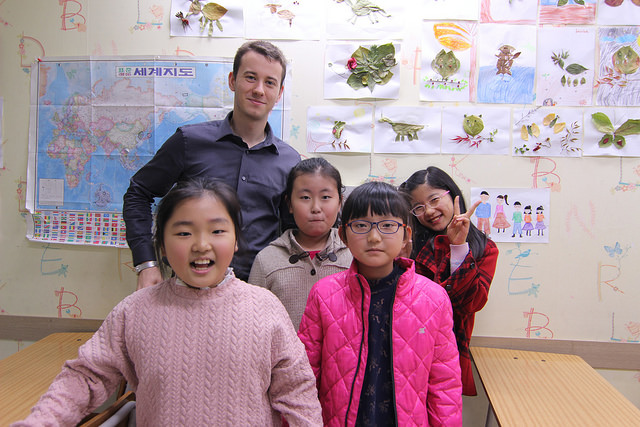
How to Teach English in Korea?


English is not a widely spoken language in Korea, as the country's official languages are Korean and Korean Sign Language. However, English is taught as a mandatory subject in Korean schools, and many people in Korea have a basic understanding of the language.

English is especially important in Korea's business and international relations, as it is the most commonly used language for international communication. Many Korean businesses, especially those that operate internationally, require their employees to have a certain level of English proficiency.

In addition, English is often used in Korea's tourism industry, as many foreign tourists visit the country and may not speak Korean. English signs and information are commonly found in tourist areas and on public transportation, and many Korean businesses, such as hotels and restaurants, have staff who speak English to assist foreign visitors.

Overall, English is not a widely spoken language in Korea, but it is important in the country's business and international relations, and is commonly used in the tourism industry. Many Korean people have a basic understanding of English, and it is taught as a mandatory subject in schools.

How to Teach English in Korea?


To teach English in Korea, you will need to follow these steps:

  1. Obtain a bachelor's degree in English, education, or a related field. Most schools in Korea require their English teachers to have at least a bachelor's degree.

  2. Get certified as an English teacher. There are several different options for obtaining certification, including the TESOL (Teaching English to Speakers of Other Languages) certification or the CELTA (Certificate in English Language Teaching to Adults) certification.

  3. Find a job teaching English in Korea. There are several different options for finding a job teaching English in Korea, including teaching at a public or private school, teaching at a language institute, or teaching at a private academy (hagwon).

  4. Obtain a visa and work permit. In order to work in Korea, you will need to obtain a work visa and work permit. You can apply for these through the Korean Embassy or Consulate in your home country, or through a Korean immigration office after you arrive in Korea.

  5. Prepare for your job as an English teacher. Once you have been hired to teach English in Korea, you will need to prepare for your job by familiarizing yourself with the school or institution where you will be teaching, and by creating lesson plans and materials that are appropriate for your students' level and needs.

Overall, to teach English in Korea, you will need to obtain a bachelor's degree and certification as an English teacher, find a job teaching English in Korea, obtain a visa and work permit, and prepare for your job as an English teacher. This process can take some time and effort, but can be a rewarding experience for those who are interested in teaching English and living in Korea.


How to Fix PS5 Controller Drift?


PS5 controller drift is a common issue that can occur with the PS5 DualSense controller, where the control stick moves on its own without input from the user. This can be frustrating and can affect the gameplay experience.

Controller drift is typically caused by a hardware issue, such as a faulty control stick or a problem with the controller's internal gyroscope. In some cases, controller drift can also be caused by debris or grime accumulating on the control stick.

If your PS5 controller is experiencing drift, there are a few steps you can try to fix the issue, such as restarting the controller, updating the firmware, cleaning the control stick, or calibrating the controller. If the issue persists, you may need to replace the controller.

Overall, PS5 controller drift is a common issue that can affect the gameplay experience. However, there are steps you can take to try to fix the issue, and in some cases, you may need to replace the controller to resolve the problem.


If your PS5 controller is experiencing drift, where the control stick moves on its own without input from the user, there are a few steps you can try to fix the issue. Here's what you can do to fix PS5 controller drift:

  1. Restart the controller by holding down the PlayStation button and the Share button simultaneously for a few seconds until the light on the controller turns off. Then, press the PlayStation button again to turn the controller back on.

  2. Update the controller firmware by connecting the controller to your PS5 using a USB cable, and then going to the "Devices" section of the PS5 settings menu. Select the controller, and then select "Update System Software" to check for and install any available updates.

  3. Clean the control stick by using a soft, dry cloth to gently wipe away any debris or grime that may have accumulated on the control stick. Be careful not to use any liquid or cleaning solution, as this can damage the controller.

  4. Calibrate the controller by going to the "Devices" section of the PS5 settings menu, selecting the controller, and then selecting "Calibrate Control Sticks." Follow the on-screen instructions to calibrate the control stick and ensure that it is functioning properly.

  5. If the controller is still experiencing drift after trying these steps, you may need to replace the controller. Contact Sony customer support for assistance with replacing the controller under warranty, if applicable.

Overall, drift on a PS5 controller can be frustrating, but there are a few steps you can try to fix the issue. If the controller is still not functioning properly after trying these steps, you may need to replace the controller.


To use a Roblox gift card, you will need to have a Roblox account and be logged in to the account. Here's how:

  1. Go to the Roblox website and log in to your account.

  2. Click on the "Robux" tab in the top menu bar.

  3. Click on the "Buy Robux" button in the top right corner of the page.

  4. Select the "Redeem a Card" option from the list of payment methods.

  5. Enter the code from your Roblox gift card in the space provided, and click "Redeem".

  6. The amount on your gift card will be added to your Roblox account balance, and you can use it to buy virtual items or in-game currency in Roblox.

Overall, using a Roblox gift card is a simple process that allows you to add funds to your Roblox account and buy virtual items or in-game currency. By following these steps, you can easily use your Roblox gift card and enjoy all that the Roblox platform has to offer.

How To Drawing Easy - Learn How To Draw A Turkey, Shooting Star, Mandala, And Castle!


To learn how to draw a turkey, shooting star, mandala, and castle, you can follow these steps:

To draw a turkey:

  1. Start by drawing a circle for the body of the turkey.

  2. Draw a small circle inside the larger circle for the turkey's head.

  3. Draw a triangle for the beak, and two small circles for the eyes.

  4. Draw a curved line for the neck, and two curved lines for the wings.

  5. Draw two curved lines for the legs, and a small oval for the tail feathers.

  6. Erase any unnecessary lines, and add details such as feathers, wattle, and snood to complete the turkey.

To draw a shooting star:

  1. Start by drawing a long, curved line for the tail of the shooting star.

  2. Draw a smaller curved line coming off the tail, to create the appearance of a starburst.

  3. Draw a small circle at the end of the tail, to represent the shooting star's core.

  4. Erase any unnecessary lines, and add details such as sparkles or a trail of light to complete the shooting star.

To draw a mandala:

  1. Start by drawing a circle in the center of your page.

  2. Draw smaller circles around the center circle, creating a circular pattern.

  3. Add more circles and patterns to the mandala, using shapes and lines to create intricate designs.

  4. Erase any unnecessary lines, and add color or shading to the mandala to give it depth and dimension.

To draw a castle:

  1. Start by drawing a large rectangle for the main body of the castle.

  2. Draw two smaller rectangles on top of the main rectangle, to create the appearance of castle towers.

  3. Draw a line across the top of the castle, to represent the castle wall.

  4. Draw a smaller rectangle on the front of the castle, to represent the castle gate.

  5. Add details such as windows, doors, and flags to the castle to give it character and dimension.

Overall, learning how to draw is fun and rewarding, and can be done with a little practice and patience. By following these steps, you can learn how to draw a turkey, shooting star, mandala, and castle, and create your own unique and beautiful drawings.

How to Handle Kids Tantrums?


To handle a child's tantrum, you can follow these steps:

  1. Stay calm: It can be difficult to remain calm when your child is having a tantrum, but it's important to try to maintain a calm and collected demeanor. This can help your child to calm down more quickly and can prevent the situation from escalating.

  2. Acknowledge your child's feelings: Let your child know that you understand that they are upset, and that it's okay to feel that way. This can help them to feel heard and validated, and can make it easier for them to calm down.

  3. Set limits and boundaries: While it's important to validate your child's feelings, it's also important to set limits and boundaries. Let your child know what behavior is acceptable and what is not, and be firm but fair in enforcing those boundaries.

  4. Use distraction and redirection: If your child is having a tantrum because they want something that they can't have, try to distract or redirect their attention to something else. For example, if they are throwing a fit because they want a toy in a store, offer them a different toy or a snack to distract them.

  5. Take a break: If the tantrum is not stopping, and if your child is not in danger, it may be best to take a break and leave the situation. This can give you both a chance to calm down and regroup, and can prevent the tantrum from getting worse.

Overall, handling a child's tantrum can be challenging, but it's important to remain calm, set limits and boundaries, and use distraction and redirection when necessary.

Free Learn How-To Tutorials

Search This Blog

Menu Halaman Statis

About Me